
Amazon Listing Optimization with AI: How It Really Works
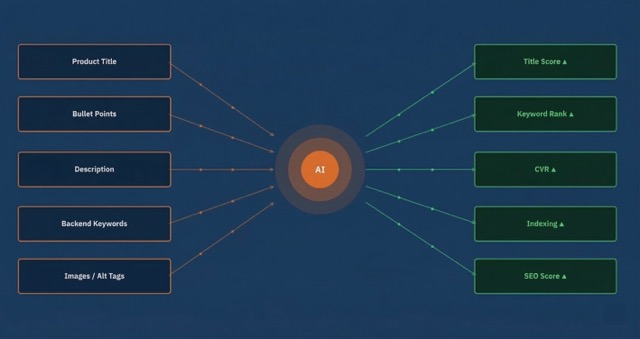
Your Amazon listing is your digital storefront — yet most sellers leave their titles, bullet points, and backend keywords untouched for months. The result: declining rankings, stagnating conversion rates, and rising ad costs.
In this article, we'll show you how AI-powered listing optimization works, which five elements offer the biggest leverage, and why the connection between listing and PPC is the key to sustainable growth on Amazon.
What Is AI-Powered Listing Optimization?
AI-powered listing optimization uses machine learning and language models to improve your Amazon product pages based on data. Instead of manually researching keywords and rewriting text, AI automatically analyzes search volume, competitor content, and conversion data — generating optimized listing elements.
The key difference from traditional optimization: AI recognizes patterns across millions of data points that are invisible manually. It knows which keyword combinations have the highest conversion probability in which context — and adjusts your listings accordingly.
This doesn't mean AI simply generates text. Good listing optimization combines keyword data, competitive analysis, and Amazon A9/Cosmo algorithm understanding into a strategy optimized for both the algorithm and the buyer.
The 5 Listing Elements AI Optimizes

1. Product Title
The title is the most important indexing element on Amazon. The first 80 characters are critical — they appear in mobile view and in ads. AI analyzes the top 10 competitors for your main keyword and identifies the optimal keyword order, brand placement, and attribute structure.
- Main keyword at position 1–3: AI prioritizes the highest-revenue keyword at the title start
- Brand name: Strategically placed — front for strong brands, back for generics
- USP integration: Materials, sizes, or certifications derived from PPC data
- Character limit: Use all 200 characters, but put the most important info in the first 80
2. Bullet Points (5 Highlights)
The five bullet points are your conversion tool. They determine whether a visitor becomes a buyer. AI optimizes them on two levels: keyword density for the algorithm and benefit communication for the customer.
- Bullets 1–2: Main keywords + strongest product benefit (solves the primary purchase motivation)
- Bullets 3–4: Secondary keywords + technical details that build trust
- Bullet 5: Long-tail keywords + guarantee/service note (reduces return rate)
- Formatting: CAPS introduction + body text — proven to increase read rate
3. Product Description / A+ Content
The product description is underestimated by many sellers — yet Amazon indexes this text too. For Brand Registry owners, A+ Content is the most powerful conversion tool: products with A+ Content show an average 5–10% higher conversion rate.
AI analyzes which content modules (comparison tables, lifestyle images, feature highlights) convert best for your product category and suggests an optimal module sequence.
4. Backend Keywords (Search Terms)
The 250 bytes of backend keywords are invisible to customers but crucial for indexing. This is where you place all synonyms, misspellings, and long-tail variations that don't fit in the visible text.
- No repetitions: AI ensures no keyword appears twice (title + backend)
- Spelling variations: "watches" vs. "watch", "wristwatch" — all variations covered
- Multilingual terms: When your market has multilingual buyers
- Byte limit: Exactly 250 bytes — AI maximizes usage without exceeding
5. Image Alt Tags and File Names
An often forgotten ranking factor: Amazon indexes file names and alt tags of product images. AI generates SEO-optimized file names (e.g., stainless-steel-watch-men-black-42mm.jpg) and alt texts optimized for both Amazon search and Google Image Search.
Keyword Integration: From Research to Placement

Step 1 — Build the Keyword Pool
The foundation of every optimization is a comprehensive keyword pool. AI aggregates data from multiple sources:
- PPC Search Term Reports: Which search terms actually led to sales?
- Competitor listings: Which keywords do the top 10 sellers in your niche use?
- Amazon Autocomplete: What suggestions does Amazon show for your main keyword?
- Brand Analytics: Which keywords show rising search trends?
Step 2 — Keyword Placement Strategy
Not every keyword has the same value — and not every placement has the same effect. AI creates a prioritization matrix:
| Priority | Keyword Type | Placement |
|---|---|---|
| A — Revenue Drivers | Top 3 by search volume + CVR | Title (position 1–3) |
| B — Conversion Relevant | Keywords with ≥ 2 PPC orders | Bullet Points 1–2 |
| C — Long-Tail | 3–5 word combinations | Bullet Points 3–5 + Description |
| D — Supplementary | Synonyms, spelling variants | Backend Keywords |
Step 3 — Continuous Monitoring
Listing optimization isn't a one-time project. Search behavior changes, new competitors appear, seasonal trends shift keywords. An AI system like MarketplAIce monitors these changes continuously and suggests adjustments before you lose rankings.
Don't underestimate long-tail keywords: 3–5 word combinations often have lower search volume but significantly higher conversion rates. AI identifies these niche keywords automatically from your PPC data and places them strategically in bullets and backend.
How MarketplAIce Analyzes and Improves Listings
MarketplAIce combines three data sources that no manual process can efficiently bring together:
- PPC performance data: Which keywords actually convert? Not search volume — real sales decide.
- Competitive benchmark: Which keywords do your top 10 competitors use that you haven't covered? Where are the gaps?
- Algorithmic analysis: How does Amazon currently rate your listing? Which relevance signals are missing? Where are you losing indexing?
The result is a Listing Score per product — broken down by title, bullets, backend keywords, and overall relevance. Each score is backed by concrete action items.
Listing Optimization and PPC: The Interplay
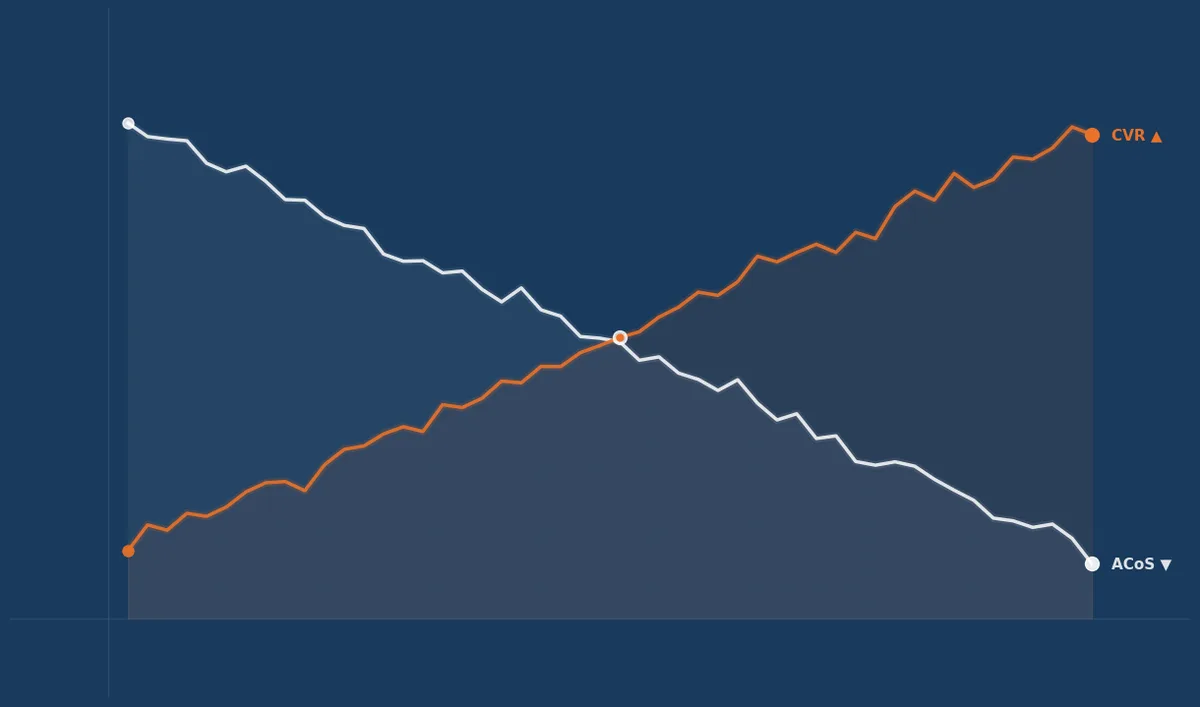
Listing optimization and PPC aren't separate disciplines — they amplify each other. An optimized listing improves your PPC performance on three levels:
- Higher relevance score: Amazon shows your ads more frequently and at lower cost when listing and keyword align
- Better conversion rate: Optimized bullet points and titles convert more clicks to purchases → ACoS drops
- More organic rankings: Every PPC sale strengthens your organic ranking — with an optimized listing you benefit double
The reverse direction works just as well: your PPC data shows you which keywords actually convert — and those are exactly the ones that belong prominently in your listing.
Bidirectional data loop: PPC data reveals which keywords convert → those belong in your listing. Conversely, an optimized listing boosts PPC conversion → lower ACoS → more budget for new keywords. MarketplAIce automates this cycle entirely.
Common Mistakes in Listing Optimization
- Keyword stuffing: Too many keywords in the title make it unreadable — and Amazon now actively penalizes this. Quality over quantity.
- Copy-pasting competitors: Copying competitor listings provides no differentiation and can lead to trademark issues.
- Ignoring backend keywords: Many sellers leave the 250 bytes completely empty — wasted potential for hundreds of additional search terms.
- One-time optimization: Optimizing a listing once and then ignoring it for months is like going to the gym once and expecting results.
- Not using PPC data: The Search Term Report is the most valuable data source for listing optimization — and most sellers don't use it for this purpose.
What You Can Do Today
- Check your top 5 products: Are the highest-revenue keywords in the title at position 1–3? If not, adjust.
- Check your backend keywords: Open Seller Central → Inventory → Edit Listing → Keywords. Are all 250 bytes used?
- Compare with competitors: Open the top 3 competitor listings and note keywords you're not covering.
- Check your Search Term Report: Which search terms have ≥ 3 orders? Those keywords must be in your listing.
- Or: Try MarketplAIce: Let AI analyze your listing and get immediate, concrete optimization suggestions.
Fully Automated Listing Optimization — with MarketplAIce
MarketplAIce analyzes keywords, competitor listings, and your PPC performance daily — delivering concrete optimization recommendations without manual work.
Try Free for 14 DaysTry MarketplAIce Free for 14 Days
No contract. No credit card. Just start.
Frequently Asked Questions
For Agencies 🏢
Managing multiple Amazon sellers? MarketplAIce scales listing optimization across all clients — with a dashboard that keeps everything in view.
Partner Program →For Sellers 🛒
Want to optimize your listings yourself — without hours of keyword research? Start now with AI analysis and instantly see where potential lies.
Try Free for 14 Days →Jorginho Engelmeyer
Founder & CEO, MarketplAIce
Jorginho Engelmeyer is Founder of MarketplAIce and has been working in Amazon advertising for over 8 years.
Learn more →